 Mic Test
Common Microphone Problems and Fixes
Microphone issues can be frustrating especially the times when you're about to join an important call, record audio or go live. A sudden drop in sound, unwanted background noise or distorted audio can quickly disrupt your workflow and affect your confidence. The good news is that most microphone problems are not complicated and can usually be resolved within a few minutes once you understand the root cause.
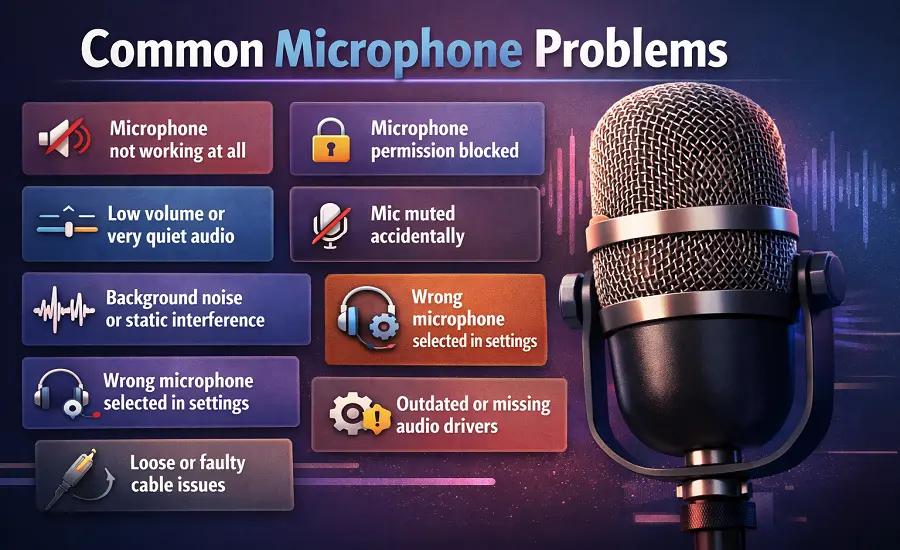
Identifying common issues early not only saves time but also prevents unnecessary adjustments or equipment changes. In many cases small improvements in settings, positioning or accessories can make a noticeable difference in overall performance. So, along with the troubleshooting you have to improve microphone quality as well to ensure that your audio stays clear, balanced and professional in any situation.
Microphone Not Detecting Any Sound
One of the most common issues is when the microphone appears connected but no sound is detected. This often happens due to incorrect input selection or blocked permissions. First, check your device or browser settings and confirm the correct microphone is selected as the active input. If you're using a browser-based tool, make sure microphone access is allowed. Also, inspect physical connections for loose cables or faulty USB ports can prevent proper input. Testing your microphone online is a quick way to confirm whether it's actually receiving sound.
Many common microphone issues can be avoided with a simple sound check before you start recording. Understanding why microphone testing matters helps you catch problems early and prevent frustrating interruptions later.
🔇 No Sound From the Microphone
Your microphone is connected and recognized by Windows or macOS but nobody can hear you. This problem usually comes down to a muted microphone at the system level, the application level or on the headset itself. Check the input volume in your sound settings and make sure the level is not set to zero. Also look for a physical mute button on your headset or keyboard that may have been pressed accidentally.
If the system shows input activity but the other person still cannot hear you then the issue is likely inside the application. Zoom, Microsoft Teams, Google Meet and Discord all have their own microphone settings separate from the operating system. Run a playback test or recorded sample check to confirm whether the microphone is actually capturing audio before joining your call.
🔉 Low Microphone Volume or Weak Sound
A quiet microphone does not always mean the hardware is faulty. Low mic volume is often caused by incorrect gain settings or too much distance between you and the microphone. Open your sound settings on Windows or macOS and check the input volume slider. If the level is already at maximum then enable microphone boost which adds extra gain to the signal.
Speaking distance matters more than most people realize. Keeping your mouth 6 to 12 inches from the microphone provides the best balance between volume and clarity. USB microphones and webcam microphones are especially sensitive to distance because they have smaller diaphragms. If the volume is still weak after adjusting settings your microphone may need a preamp or audio interface to drive a stronger signal.
📢 Background Noise, Hum, Hiss and Static
Unwanted background noise is one of the most common audio complaints during calls and recordings. Fans, air vents, keyboard clicks and room reflections all add noise that your microphone picks up along with your voice. Electrical hum and buzzing are usually caused by grounding problems or unshielded cables picking up interference from nearby electronics. Moving your microphone away from your computer and using a shielded cable can reduce this type of noise significantly.
Software-based noise suppression is another effective solution. Applications like Krisp and NVIDIA Broadcast use real-time processing to filter out background sounds without affecting your voice. Chrome, Discord and OBS also have built-in noise reduction settings. For persistent hiss or static check your cable connections and try a different USB port to rule out interference from Wi-Fi or Bluetooth adapters sharing the same bus.
🔁 Echo, Feedback, Distortion and Clipping
Echo during calls usually happens when your speakers play back audio that your microphone picks up again. This creates a feedback loop that makes conversations difficult. The easiest fix is to use headphones so the microphone cannot hear the speaker output. If you must use speakers then enable echo cancellation in your application settings or in your operating system sound preferences.
Distorted or clipping audio means the input signal is too strong for your system to handle cleanly. This happens when the input gain is set too high or when you speak too close to the microphone. Reduce the input level in sound settings until the meter stays below the red zone. Muffled audio is a separate issue that often points to a foam cover that is too thick or a microphone positioned at the wrong angle relative to your mouth.
🔒 Permissions, Privacy and Browser Access
Modern browsers and operating systems block microphone access by default to protect user privacy. On Windows 10 and Windows 11 you need to enable microphone access under Privacy and Security settings for both apps and desktop programs. On macOS the same control is found in System Settings under Privacy and Security. If these toggles are off then no application or website can receive audio from your microphone.
Browser-level permissions add another layer of control. Chrome, Safari, Microsoft Edge and Firefox each manage microphone access per website. If you blocked permission previously then the browser remembers that choice until you change it manually. Click the lock icon or site settings button in your address bar to check and update microphone permissions for that specific page.
🎛️ Wrong Input Device and App-Specific Problems
Your microphone may work perfectly at the system level but fail inside a specific application. This happens when the app selects a different input device than the one you intend to use. A laptop's built-in microphone or a webcam mic often gets selected by default instead of your external headset or USB microphone. Check the audio settings inside Zoom, Microsoft Teams, Google Meet, Discord or Skype and manually select the correct microphone.
Some applications use exclusive mode which locks the microphone to one app at a time. If another program is holding the mic then your current app cannot access it. Close any other application that might be using the microphone and then restart your call or recording software. Running a test call or using the in-app self-check feature confirms that the correct device is active before your meeting begins.
⚡ Power, Interface and Microphone-Type Issues
Not all microphones work in the same way. Condenser microphones like the Shure SM7B require phantom power (48V) from an audio interface or mixer to operate. If your condenser mic produces no sound then check whether phantom power is enabled on your interface. Dynamic microphones do not need external power but may require a preamp for adequate volume when connected to a basic audio interface.
USB microphones are plug-and-play on most systems but can fail if connected through an unpowered USB hub. Always connect USB mics directly to your computer's USB port for a reliable connection. XLR microphones need a proper audio interface with the correct cable and impedance matching. If you are unsure which type suits your setup read our guide to choosing the right microphone for your use case.
📡 Wireless Interference, Latency and Compatibility
Wireless microphones and Bluetooth headsets are convenient but they introduce unique challenges. Signal dropout and delayed audio are common when the wireless receiver is too far from the transmitter or when other devices share the same frequency band. Bluetooth devices operating on 2.4 GHz can conflict with Wi-Fi routers causing intermittent audio cuts. Moving the receiver closer and reducing wireless congestion usually resolves signal issues.
Latency is another concern with wireless setups especially for recording and live streaming. Bluetooth adds noticeable delay that makes real-time monitoring difficult. Professional wireless systems using UHF frequencies offer lower latency than consumer Bluetooth connections. If you need zero-latency monitoring then a wired connection through USB or XLR is still the most reliable approach.
🛡️ Maintenance, Prevention and When to Replace
Most microphone problems can be prevented with regular care. Keep the microphone grille clean by wiping it gently with a dry cloth to remove dust and moisture. Store your microphone in a protective case when not in use and avoid leaving it in humid or dusty environments. Inspect cables regularly for wear and replace any cable that shows fraying or a loose connector.
Keeping audio drivers updated prevents many software-related microphone failures. Check Device Manager on Windows or System Information on macOS periodically to confirm your audio driver is current. If your microphone shows physical damage to the diaphragm or produces consistent crackling despite new cables then it may be time to consult a repair technician or consider a warranty replacement.
Ready to check your microphone? Test your mic instantly with our free online microphone test and confirm everything is working before you start.
Test Your Microphone